



















Kraken Pro puts an order book beside the trading form. We examined the public interface to see which decisions the controls clarify, where fees enter the calculation and what changes on a narrow screen.
For this Kraken Pro review, we started with the decisions the screen asks a trader to make. The last price, order book and buy form were visible together. That arrangement makes the product’s purpose clearer: instead of accepting a single purchase quote, you choose a price boundary, an order type and whether you are prepared to wait.
What we tested and what we did not
The KriptoMeta editorial team opened Kraken Pro’s BTC/USD spot page on September 25, 2026, in a desktop browser and a 390-pixel mobile viewport. We switched between Limit and Market, then opened Order form in the mobile layout. The screenshots come from those observations.
We did not create an account, deposit funds, submit an order or contact support. We also could not verify that values entered in the signed-out form persisted. The assessment covers the interface, exposed controls and official documentation. It does not assign scores to verification speed, execution quality or bank withdrawal performance.
Price, depth and orders in Kraken Pro
On desktop, the order book occupied the middle panel and the order form sat to its right. Different colors separated bids and asks, with the spread displayed between them. A moving last price is not a promise that your next purchase will execute at that number. The sell orders available to fill your chosen size still matter.
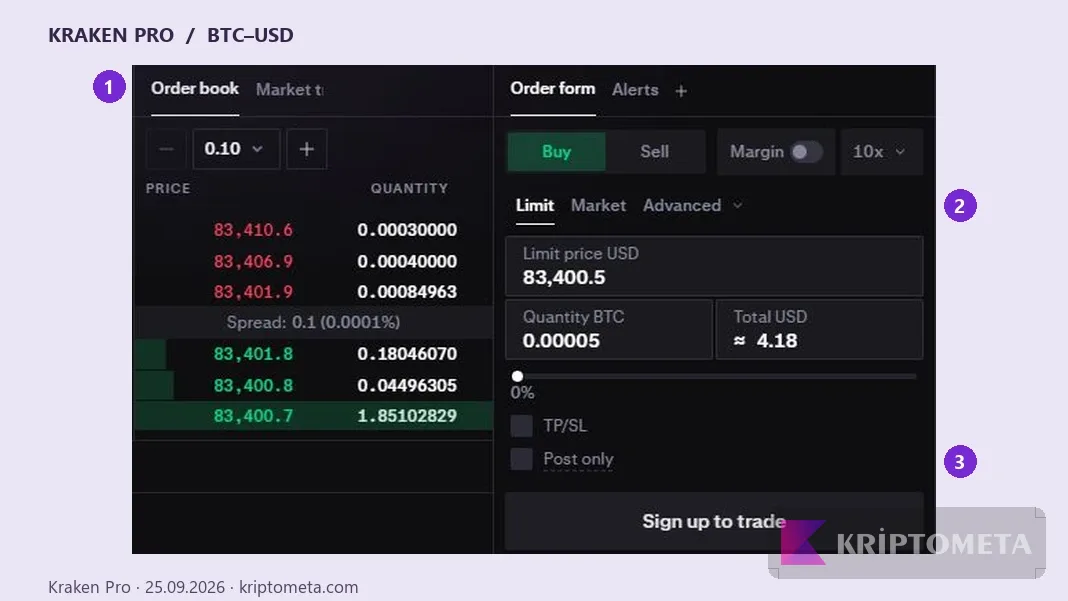
Kraken Pro, September 25, 2026. Cropped from the actual desktop screen. 1: order book; 2: order type; 3: Post only. KriptoMeta added the markers; prices belong to the capture time.
Switching to Market made the price field read-only; returning to Limit exposed a limit-price field and Post only. The visual difference helps, although it does not explain the trading terminology on its own. If you have never placed an order, the first-purchase guide provides the wider sequence from funding to checking completed fills.
The chart remained in a loading state in our test environment while the order book continued updating. We did not isolate the cause, so we are not treating that observation as a general verdict on Kraken’s chart reliability. We also exclude drawing tools from the features we successfully tested.
Why a limit order is not always a maker order
As Kraken explains in its limit-order documentation, a limit order can immediately match liquidity already on the opposite side of the book and incur taker fees. Post only cancels an order that would match immediately. It preserves the intended maker behavior, not a guarantee of execution.
Consider a hypothetical book whose lowest ask is $80,000. A buy order with an $80,100 limit could immediately match that $80,000 ask if enough quantity is available. Entering a limit did not stop the order from taking liquidity. A buy limit of $79,900 might instead rest on the book and never fill if the market stays above it.
Those are teaching figures, not a current Bitcoin quote. The useful distinction is between a price boundary and a fee classification. Insufficient quantity can also produce a partial fill. Our slippage definition explains why the expected price and execution result need to be considered separately. Our exchange-fee comparison calculates the cost when one part of an order takes liquidity and the rest fills after resting.
Trading fees are only part of the cost
On September 25, 2026, the first tier in the official Spot Crypto fee schedule showed 0.40% maker and 0.80% taker. The calculation below uses that dated schedule for illustration, not as a quote for your account. Product, region and tier can change the applicable rate.
| Execution role | Example rate | Trading fee |
|---|---|---|
| Maker | 0.40% | $1,000 × 0.004 = $4 |
| Taker | 0.80% | $1,000 × 0.008 = $8 |
The calculation excludes the bid-ask spread, slippage, funding and withdrawals. Orders with the same notional size do not necessarily deliver the same net result. An unfilled resting order also has a practical cost: the purchase you intended to make has not happened.
Older accounts of the fee model may focus only on trading volume. Kraken’s July 2026 tier announcement describes how eligible assets held on the platform can also affect qualification. Check your current account tier rather than relying on a historic review to determine the fee.
Cash and crypto exits need separate checks. Bank withdrawal conditions depend on currency and method; crypto withdrawal conditions depend on the asset and network. The steps between a sale balance and money reaching a bank are covered in our crypto cash-out guide.
How the mobile browser layout changes
At 390 pixels, tabs replaced the side-by-side desktop panels. Selecting Order form opened a single-column form with Limit and Market near the top. The controls were easier to read than a squeezed desktop panel would be, but the simultaneous view of the book and form was lost. Reading the book again required switching sections.
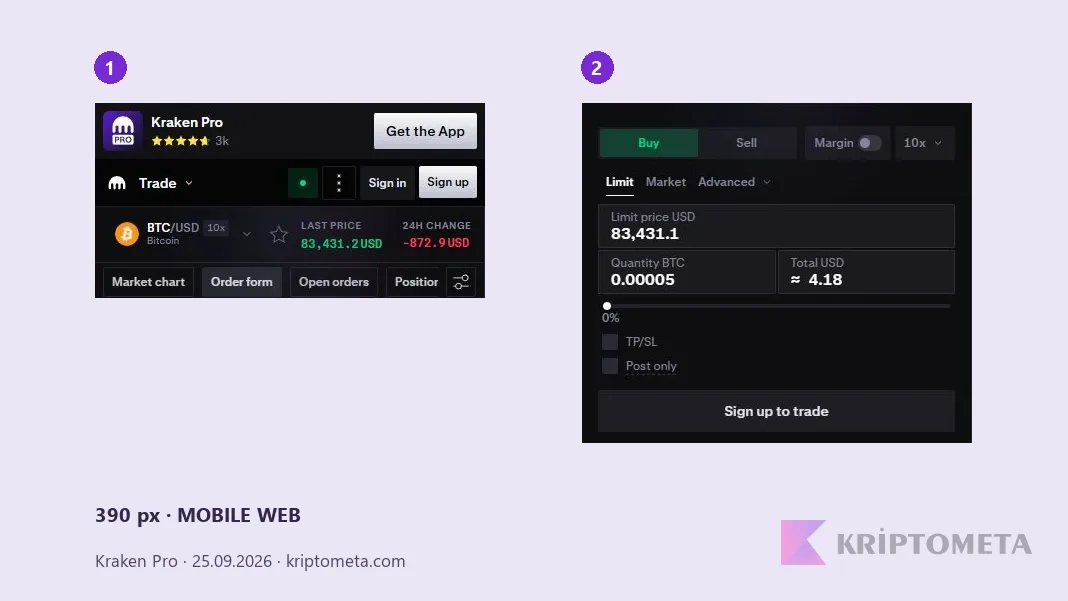
Kraken Pro mobile web, September 25, 2026. The header and order-form portions of one real capture are cropped and placed side by side; the numbers indicate their sequence. We did not test the native mobile app.
On a phone, the trading pair, Buy/Sell direction and Margin switch deserve a deliberate check. Margin was off in our observation. A leverage label beside the pair did not mean we had opened a leveraged position. This review concerns the spot interface without borrowing.
Account security and regional access checks
Reaching a public Kraken Pro page does not establish eligibility for every product where you live. The official regional conditions distinguish verified residency and account circumstances. Seeing a USD market does not establish access to ACH, a particular wire provider or an unrestricted list of assets.
Kraken documents passkey and two-factor authentication options. Those login protections address a different question from custody. A centralized exchange balance is not equivalent to funds held in a wallet whose keys you control. The presence of authentication features is not proof that every platform or custody risk has been removed.
What should you track when only part of an order fills?
Hypothetical spot example: suppose 0.012 BTC of a 0.02 BTC limit buy fills, leaving 0.008 BTC open. Cancelling the open order does not undo the filled 0.012 BTC. Removing the remainder from the book and retaining the completed trade are separate outcomes. Read quantity, price and fee in the fill history rather than relying only on the original order amount.
If part executes immediately and the remainder rests on the book, individual fills can have different fee roles. Our single-rate table is a teaching example, not a claim that every partially filled order receives one uniform commission. Kraken’s fee explanation ties the charge to matched execution. We submitted no order, so this is not presented as our account history.
Kraken Pro or a simple purchase screen?
Pro lets users manage a price limit and whether an order rests on the book. In return, they must track quantity, direction, open orders and fills. A simple purchase flow centers the decision more on the net offer presented. Do not assume the two interfaces share a fee model: compare Pro’s trading commission with the simple purchase quote, payment-method charges and any spread.
For a small one-off purchase, compare the crypto credited for the same cash outlay and the cost of withdrawing it afterwards. For a price-limited order, be willing to accept no fill. More controls are useful only when the user understands the decisions they expose. An accessible USD market page does not establish that a particular bank funding method is available in your country.
Who is Kraken Pro suited to?
The exposed controls make sense for someone who understands an order book, wants a price boundary and is willing to monitor an order. The desktop layout makes it easier to compare price levels with the order being prepared. Mobile web retains access to the information, at the expense of more switching between panels.
For a small first purchase, the same density can feel demanding. We would not treat a longer list of controls as an advantage in isolation: an unfamiliar option can create room for mistakes. Order-control needs, all-in cost, account eligibility and custody preference are more useful decision criteria. The Kraken glossary entry covers the product definition; the purchase and cash-out guides cover the surrounding workflow.